English Edition
  • తెలుగు
  • हिन्दी
  • ಕನ್ನಡ
  • മലയാളം
  • தமிழ்
  • বাংলা
  • ગુજરાતી
Get Updates
Get notified on trends, wellness, and lifestyle stories just for you!
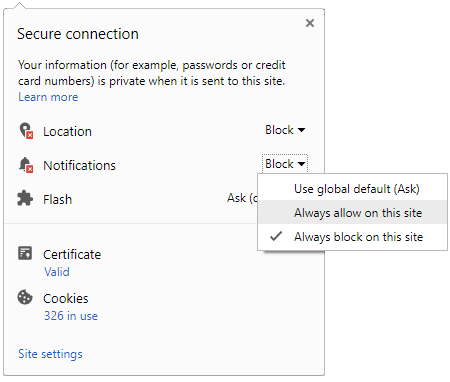
You can manage your notification subscription by clicking on the icon
To start receiving timely alerts, as shown below click on the Green “lock” icon next to the address bar
Click it and Unblock the Notifications
Close X
Close X
To Start receiving timely alerts please follow the below steps:
  • Click on the Menu icon of the browser, it opens up a list of options.
  • Click on the “Options ”, it opens up the settings page,
  • Here click on the “Privacy & Security” options listed on the left hand side of the page.
  • Scroll down the page to the “Permission” section .
  • Here click on the “Settings” tab of the Notification option.
  • A pop up will open with all listed sites, select the option “ALLOW“, for the respective site under the status head to allow the notification.
  • Once the changes is done, click on the “Save Changes” option to save the changes.
Notifications
Clear All
    No Notifications
    Boldsky
    A Oneindia Venture
    • Home
    • Winning Over Diabetes
    • Insync
    • Astro Services
    • Fashion
    • Health
    • Recipe
    • Yoga Spirituality
    • Home n Garden
    • Astrology
    • Pregnancy n Parenting
    • Brand Buzz
    Home
    Latest News
    • Style Goal Of The Week: Mix Different Prints Like A Boss
      Style Goal Of The Week: Mix Different Prints Like A Boss
    • Fashion Myth Debunked: Crop Top Can Be Only Worn By Women With Flat-Stomach
      Fashion Myth Debunked: Crop Top Can Be Only Worn By Women With Flat-Stomach
    • Is It Possible To Get A False Positive Pregnancy Test Result ?
      Is It Possible To Get A False Positive Pregnancy Test Result ?
    • 8 Amazing Cocoa Face Masks To Get Glowing Skin
      8 Amazing Cocoa Face Masks To Get Glowing Skin
    • Urinary Incontinence Symptom In Females
      Urinary Incontinence Symptom In Females
    • Zodiac Signs Who Have High Expectations In Life
      Zodiac Signs Who Have High Expectations In Life
    • Yogini Ekadashi Fast And Its Importance
      Yogini Ekadashi Fast And Its Importance
    • 8 Benefits Of Using Green Tea Ice Cubes In Your Everyday Beauty Routine
      8 Benefits Of Using Green Tea Ice Cubes In Your Everyday Beauty Routine
    • How Safe Is Gripe Water For Babies?
      How Safe Is Gripe Water For Babies?
    • How To Do A Sock Bun In 6 Easy Steps
      How To Do A Sock Bun In 6 Easy Steps
    • What Is Shared Psychotic Disorder? Is This The Reason For Burari Deaths?
      What Is Shared Psychotic Disorder? Is This The Reason For Burari Deaths?
    • Shiva Does Not Forgive These Sins
      Shiva Does Not Forgive These Sins
    • 10 Amazing Health Benefits Of Guggul
      10 Amazing Health Benefits Of Guggul
    • International Kissing Day 2018: Basic Lipstick Tips For Kiss-ready Lips
      International Kissing Day 2018: Basic Lipstick Tips For Kiss-ready Lips
    • 7 Ways To Get More Calcium In Your Diet
      7 Ways To Get More Calcium In Your Diet
    • Woah! Neha Dhupia's Attire Is So Far From Ordinary
      Woah! Neha Dhupia's Attire Is So Far From Ordinary
    • How To Get Ombre Nails?
      How To Get Ombre Nails?
    • Mahamrityunjaya Mantra Meaning and Benefits
      Mahamrityunjaya Mantra Meaning and Benefits
     
    Boldsky
    Boldsky in Other Languages
    • हिन्दी
    • ಕನ್ನಡ
    • മലയാളം
    • தமிழ்
    • తెలుగు
    • বাংলা
    • ગુજરાતી
    Explore Boldsky
    • Health
    • Recipes
    • Insync
    • Fashion
    • Home-n-Garden
    • Yoga-Spirituality
    • Pregnancy-Parenting
    Other Greynium Sites
    • Filmibeat
    • Drivespark
    • Gizbot
    • Goodreturns
    • Native Planet
    • Careerindia
    • Clickin
    Follow Boldsky
    twitter
    Get Oneindia Alerts
    Get Push Notifications
    About Us | Terms of Service | Privacy Policy | RSS | Contact Us | Feedback | Sitemap | Cookie Policy | Code of Business Conduct | Grievance | Corrections Policy
    © Greynium Information Technologies Pvt. Ltd. All Rights Reserved.
    Notifications
    Settings
    Clear Notifications
      No New Notifications
      Notifications
      Use the toggle to switch on notifications
      • Block for 8 hours
      • Block for 12 hours
      • Block for 24 hours
      • Don't block
      To start receiving timely alerts, as shown below click on the Green “lock” icon next to the address bar
      Click it and Unblock the Notifications
      Close X
      Close X
      To Start receiving timely alerts please follow the below steps:
      • Click on the Menu icon of the browser, it opens up a list of options.
      • Click on the “Options ”, it opens up the settings page,
      • Here click on the “Privacy & Security” options listed on the left hand side of the page.
      • Scroll down the page to the “Permission” section .
      • Here click on the “Settings” tab of the Notification option.
      • A pop up will open with all listed sites, select the option “ALLOW“, for the respective site under the status head to allow the notification.
      • Once the changes is done, click on the “Save Changes” option to save the changes.
      Log in for Better Reading Experience!
      • Sign in with Google Continue with Google
      By signing in, you agree to our Terms and Privacy Policy
      Gender
      Select your Gender
      • Male
      • Female
      • Others
      Age
      Select your Age Range
      • Under 18
      • 18 to 25
      • 26 to 35
      • 36 to 45
      • 45 to 55
      • 55+
      Sign Out
      Advertisement