English Edition
  • తెలుగు
  • हिन्दी
  • ಕನ್ನಡ
  • മലയാളം
  • தமிழ்
  • বাংলা
  • ગુજરાતી
Diwali
Get Updates
Get notified on trends, wellness, and lifestyle stories just for you!
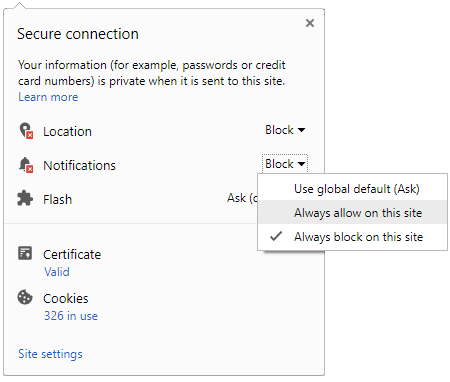
You can manage your notification subscription by clicking on the icon
To start receiving timely alerts, as shown below click on the Green “lock” icon next to the address bar
Click it and Unblock the Notifications
Close X
Close X
To Start receiving timely alerts please follow the below steps:
  • Click on the Menu icon of the browser, it opens up a list of options.
  • Click on the “Options ”, it opens up the settings page,
  • Here click on the “Privacy & Security” options listed on the left hand side of the page.
  • Scroll down the page to the “Permission” section .
  • Here click on the “Settings” tab of the Notification option.
  • A pop up will open with all listed sites, select the option “ALLOW“, for the respective site under the status head to allow the notification.
  • Once the changes is done, click on the “Save Changes” option to save the changes.
Notifications
Clear All
    No Notifications
    Boldsky
    A Oneindia Venture
    • Home
    • Winning Over Diabetes
    • Insync
    • Astro Services
    • Fashion
    • Health
    • Recipe
    • Yoga Spirituality
    • Home n Garden
    • Astrology
    • Pregnancy n Parenting
    • Brand Buzz
    Home Health
    HEALTH
    • 10 Worst Foods For Your Brain
      10 Worst Foods For Your Brain
    • Binge Eating May Up Various Health Conditions
      Binge Eating May Up Various Health Conditions
    • Who Are Affected The Most With UTI?
      Who Are Affected The Most With UTI?
    • Get Cured Of Your Hangover Instantly With These Foods
      Get Cured Of Your Hangover Instantly With These Foods
    • Having A Toothache Or A Bleeding Gum? It Could Be A Signal That Your Teeth Health Is Not Okay
      Having A Toothache Or A Bleeding Gum? It Could Be A Signal That Your Teeth Health Is Not Okay
    • 7 Surprising Facts You Need To Know About Dementia
      7 Surprising Facts You Need To Know About Dementia
    • 12 Foods That Can Reduce Gastritis!
      12 Foods That Can Reduce Gastritis!
    • Thinking Twice Before Munching On That Chicken Stick? Don’t, There Is Ayurveda To Treat The Acidity
      Thinking Twice Before Munching On That Chicken Stick? Don’t, There Is Ayurveda To Treat The Acidity
    • Suffering From Appetite Loss? These Common Foods Will Help To Get Back Your Appetite In A Week!
      Suffering From Appetite Loss? These Common Foods Will Help To Get Back Your Appetite In A Week!
    • Health Benefits Of Grapefruits
      Health Benefits Of Grapefruits
    • Surprising Signs Of Marijuana Addiction That You Must Not Ignore!
      Surprising Signs Of Marijuana Addiction That You Must Not Ignore!
    • Harmful Side Effects Of Diet Pills
      Harmful Side Effects Of Diet Pills
    • What Are Processed Foods?
      What Are Processed Foods?
     
    Boldsky
    Boldsky in Other Languages
    • हिन्दी
    • ಕನ್ನಡ
    • മലയാളം
    • தமிழ்
    • తెలుగు
    • বাংলা
    • ગુજરાતી
    Explore Boldsky
    • Health
    • Recipes
    • Insync
    • Fashion
    • Home-n-Garden
    • Yoga-Spirituality
    • Pregnancy-Parenting
    Other Greynium Sites
    • Filmibeat
    • Drivespark
    • Gizbot
    • Goodreturns
    • Native Planet
    • Careerindia
    • Clickin
    Follow Boldsky
    twitter
    Get Oneindia Alerts
    Get Push Notifications
    About Us | Terms of Service | Privacy Policy | RSS | Contact Us | Feedback | Sitemap | Cookie Policy | Code of Business Conduct | Grievance | Corrections Policy
    © Greynium Information Technologies Pvt. Ltd. All Rights Reserved.
    Notifications
    Settings
    Clear Notifications
      No New Notifications
      Notifications
      Use the toggle to switch on notifications
      • Block for 8 hours
      • Block for 12 hours
      • Block for 24 hours
      • Don't block
      To start receiving timely alerts, as shown below click on the Green “lock” icon next to the address bar
      Click it and Unblock the Notifications
      Close X
      Close X
      To Start receiving timely alerts please follow the below steps:
      • Click on the Menu icon of the browser, it opens up a list of options.
      • Click on the “Options ”, it opens up the settings page,
      • Here click on the “Privacy & Security” options listed on the left hand side of the page.
      • Scroll down the page to the “Permission” section .
      • Here click on the “Settings” tab of the Notification option.
      • A pop up will open with all listed sites, select the option “ALLOW“, for the respective site under the status head to allow the notification.
      • Once the changes is done, click on the “Save Changes” option to save the changes.
      Log in for Better Reading Experience!
      • Sign in with Google Continue with Google
      By signing in, you agree to our Terms and Privacy Policy
      Gender
      Select your Gender
      • Male
      • Female
      • Others
      Age
      Select your Age Range
      • Under 18
      • 18 to 25
      • 26 to 35
      • 36 to 45
      • 45 to 55
      • 55+
      Sign Out
      Advertisement