English Edition
  • తెలుగు
  • हिन्दी
  • ಕನ್ನಡ
  • മലയാളം
  • தமிழ்
  • বাংলা
  • ગુજરાતી
Diwali
Get Updates
Get notified on trends, wellness, and lifestyle stories just for you!
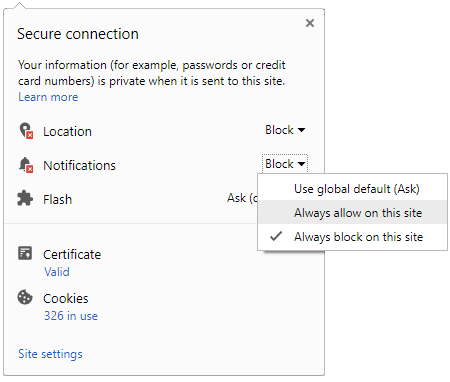
You can manage your notification subscription by clicking on the icon
To start receiving timely alerts, as shown below click on the Green “lock” icon next to the address bar
Click it and Unblock the Notifications
Close X
Close X
To Start receiving timely alerts please follow the below steps:
  • Click on the Menu icon of the browser, it opens up a list of options.
  • Click on the “Options ”, it opens up the settings page,
  • Here click on the “Privacy & Security” options listed on the left hand side of the page.
  • Scroll down the page to the “Permission” section .
  • Here click on the “Settings” tab of the Notification option.
  • A pop up will open with all listed sites, select the option “ALLOW“, for the respective site under the status head to allow the notification.
  • Once the changes is done, click on the “Save Changes” option to save the changes.
Notifications
Clear All
    No Notifications
    Boldsky
    A Oneindia Venture
    • Home
    • Winning Over Diabetes
    • Insync
    • Astro Services
    • Fashion
    • Health
    • Recipe
    • Yoga Spirituality
    • Home n Garden
    • Astrology
    • Pregnancy n Parenting
    • Brand Buzz
    Home Insync
    INSYNC
    • Man Who Pierced 15 Needles Into His Penis & Survived!
      Man Who Pierced 15 Needles Into His Penis & Survived!
    • Unseen Pictures Of Indian Leaders
      Unseen Pictures Of Indian Leaders
    • Say Goodbye To Monday Blues With These Inspiring Quotes
      Say Goodbye To Monday Blues With These Inspiring Quotes
    • Indian Temples Where Men Are NOT Allowed
      Indian Temples Where Men Are NOT Allowed
    • Perfect-timing Pictures Clicked Just Before Tragedy Struck
      Perfect-timing Pictures Clicked Just Before Tragedy Struck
    • Do You Hear Dead People Calling Out Your Name In Your Dreams?
      Do You Hear Dead People Calling Out Your Name In Your Dreams?
    • Vaastu Tips On How To Get Successful In Business
      Vaastu Tips On How To Get Successful In Business
    • World Emoji Day 2019: Whatsapp Emojis & Their Hidden Meanings
      World Emoji Day 2019: Whatsapp Emojis & Their Hidden Meanings
    • What These Images On The Backside Of Indian Currency Notes Signify
      What These Images On The Backside Of Indian Currency Notes Signify
    • The Only Hindu Temple That People Are Scared To Visit
      The Only Hindu Temple That People Are Scared To Visit
    • The Most Useless Hacks That People Have Discovered
      The Most Useless Hacks That People Have Discovered
    • This 'Half-human Half-Beast' Sheep Image Is Viral
      This 'Half-human Half-Beast' Sheep Image Is Viral
    • Things That Will Happen If Men Become Extinct On This Planet!
      Things That Will Happen If Men Become Extinct On This Planet!
     
    Boldsky
    Boldsky in Other Languages
    • हिन्दी
    • ಕನ್ನಡ
    • മലയാളം
    • தமிழ்
    • తెలుగు
    • বাংলা
    • ગુજરાતી
    Explore Boldsky
    • Health
    • Recipes
    • Insync
    • Fashion
    • Home-n-Garden
    • Yoga-Spirituality
    • Pregnancy-Parenting
    Other Greynium Sites
    • Filmibeat
    • Drivespark
    • Gizbot
    • Goodreturns
    • Native Planet
    • Careerindia
    • Clickin
    Follow Boldsky
    twitter
    Get Oneindia Alerts
    Get Push Notifications
    About Us | Terms of Service | Privacy Policy | RSS | Contact Us | Feedback | Sitemap | Cookie Policy | Code of Business Conduct | Grievance | Corrections Policy
    © Greynium Information Technologies Pvt. Ltd. All Rights Reserved.
    Notifications
    Settings
    Clear Notifications
      No New Notifications
      Notifications
      Use the toggle to switch on notifications
      • Block for 8 hours
      • Block for 12 hours
      • Block for 24 hours
      • Don't block
      To start receiving timely alerts, as shown below click on the Green “lock” icon next to the address bar
      Click it and Unblock the Notifications
      Close X
      Close X
      To Start receiving timely alerts please follow the below steps:
      • Click on the Menu icon of the browser, it opens up a list of options.
      • Click on the “Options ”, it opens up the settings page,
      • Here click on the “Privacy & Security” options listed on the left hand side of the page.
      • Scroll down the page to the “Permission” section .
      • Here click on the “Settings” tab of the Notification option.
      • A pop up will open with all listed sites, select the option “ALLOW“, for the respective site under the status head to allow the notification.
      • Once the changes is done, click on the “Save Changes” option to save the changes.
      Log in for Better Reading Experience!
      • Sign in with Google Continue with Google
      By signing in, you agree to our Terms and Privacy Policy
      Gender
      Select your Gender
      • Male
      • Female
      • Others
      Age
      Select your Age Range
      • Under 18
      • 18 to 25
      • 26 to 35
      • 36 to 45
      • 45 to 55
      • 55+
      Sign Out
      Advertisement