English Edition
  • తెలుగు
  • हिन्दी
  • ಕನ್ನಡ
  • മലയാളം
  • தமிழ்
  • বাংলা
  • ગુજરાતી
Diwali
Get Updates
Get notified on trends, wellness, and lifestyle stories just for you!
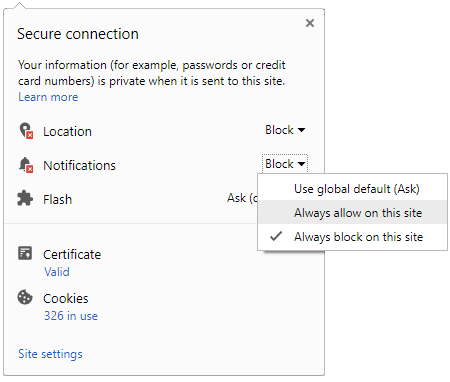
You can manage your notification subscription by clicking on the icon
To start receiving timely alerts, as shown below click on the Green “lock” icon next to the address bar
Click it and Unblock the Notifications
Close X
Close X
To Start receiving timely alerts please follow the below steps:
  • Click on the Menu icon of the browser, it opens up a list of options.
  • Click on the “Options ”, it opens up the settings page,
  • Here click on the “Privacy & Security” options listed on the left hand side of the page.
  • Scroll down the page to the “Permission” section .
  • Here click on the “Settings” tab of the Notification option.
  • A pop up will open with all listed sites, select the option “ALLOW“, for the respective site under the status head to allow the notification.
  • Once the changes is done, click on the “Save Changes” option to save the changes.
Notifications
Clear All
    No Notifications
    Boldsky
    A Oneindia Venture
    • Home
    • Winning Over Diabetes
    • Insync
    • Astro Services
    • Fashion
    • Health
    • Recipe
    • Yoga Spirituality
    • Home n Garden
    • Astrology
    • Pregnancy n Parenting
    • Brand Buzz
    Home Health
    HEALTH
    • Drinking Too Much Of Tea? 10 Reasons That Tell Why You Shouldn’t
      Drinking Too Much Of Tea? 10 Reasons That Tell Why You Shouldn’t
    • Kitchen Ingredients That Help To Get Rid Of Hickies Quickly
      Kitchen Ingredients That Help To Get Rid Of Hickies Quickly
    • Follow These 10 Common Dental Habits To Prevent Cavities & Get Healthy Teeth
      Follow These 10 Common Dental Habits To Prevent Cavities & Get Healthy Teeth
    • Try These Home Remedies For Sore Neck Muscles
      Try These Home Remedies For Sore Neck Muscles
    • Fitness Benefits Of Bowling
      Fitness Benefits Of Bowling
    • Prop Up Immune System To Prevent Cancer, Says Study
      Prop Up Immune System To Prevent Cancer, Says Study
    • How Can You Curb Nighttime Snacking?
      How Can You Curb Nighttime Snacking?
    • Secret Tips That Motivate You To Exercise Every Day!
      Secret Tips That Motivate You To Exercise Every Day!
    • Can’t Sleep At Night? Try These 10 Home Remedies To Get Yourself Back On Track
      Can’t Sleep At Night? Try These 10 Home Remedies To Get Yourself Back On Track
    • Setu Bandhasana (Bridge Pose) To Maintain Blood Pressure
      Setu Bandhasana (Bridge Pose) To Maintain Blood Pressure
    • This One Natural Rub Helps Treat Arthritis; Check It Out!
      This One Natural Rub Helps Treat Arthritis; Check It Out!
    • Foods That Trigger Psoriasis
      Foods That Trigger Psoriasis
    • Top 10 Superfoods That Help Increase Haemoglobin Level; Must Try #7
      Top 10 Superfoods That Help Increase Haemoglobin Level; Must Try #7
     
    Boldsky
    Boldsky in Other Languages
    • हिन्दी
    • ಕನ್ನಡ
    • മലയാളം
    • தமிழ்
    • తెలుగు
    • বাংলা
    • ગુજરાતી
    Explore Boldsky
    • Health
    • Recipes
    • Insync
    • Fashion
    • Home-n-Garden
    • Yoga-Spirituality
    • Pregnancy-Parenting
    Other Greynium Sites
    • Filmibeat
    • Drivespark
    • Gizbot
    • Goodreturns
    • Native Planet
    • Careerindia
    • Clickin
    Follow Boldsky
    twitter
    Get Oneindia Alerts
    Get Push Notifications
    About Us | Terms of Service | Privacy Policy | RSS | Contact Us | Feedback | Sitemap | Cookie Policy | Code of Business Conduct | Grievance | Corrections Policy
    © Greynium Information Technologies Pvt. Ltd. All Rights Reserved.
    Notifications
    Settings
    Clear Notifications
      No New Notifications
      Notifications
      Use the toggle to switch on notifications
      • Block for 8 hours
      • Block for 12 hours
      • Block for 24 hours
      • Don't block
      To start receiving timely alerts, as shown below click on the Green “lock” icon next to the address bar
      Click it and Unblock the Notifications
      Close X
      Close X
      To Start receiving timely alerts please follow the below steps:
      • Click on the Menu icon of the browser, it opens up a list of options.
      • Click on the “Options ”, it opens up the settings page,
      • Here click on the “Privacy & Security” options listed on the left hand side of the page.
      • Scroll down the page to the “Permission” section .
      • Here click on the “Settings” tab of the Notification option.
      • A pop up will open with all listed sites, select the option “ALLOW“, for the respective site under the status head to allow the notification.
      • Once the changes is done, click on the “Save Changes” option to save the changes.
      Log in for Better Reading Experience!
      • Sign in with Google Continue with Google
      By signing in, you agree to our Terms and Privacy Policy
      Gender
      Select your Gender
      • Male
      • Female
      • Others
      Age
      Select your Age Range
      • Under 18
      • 18 to 25
      • 26 to 35
      • 36 to 45
      • 45 to 55
      • 55+
      Sign Out
      Advertisement