English Edition
  • తెలుగు
  • हिन्दी
  • ಕನ್ನಡ
  • മലയാളം
  • தமிழ்
  • বাংলা
  • ગુજરાતી
Diwali
Get Updates
Get notified on trends, wellness, and lifestyle stories just for you!
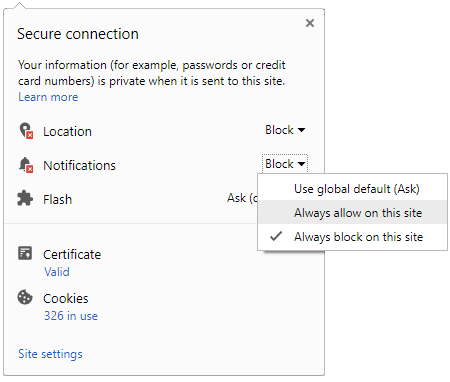
You can manage your notification subscription by clicking on the icon
To start receiving timely alerts, as shown below click on the Green “lock” icon next to the address bar
Click it and Unblock the Notifications
Close X
Close X
To Start receiving timely alerts please follow the below steps:
  • Click on the Menu icon of the browser, it opens up a list of options.
  • Click on the “Options ”, it opens up the settings page,
  • Here click on the “Privacy & Security” options listed on the left hand side of the page.
  • Scroll down the page to the “Permission” section .
  • Here click on the “Settings” tab of the Notification option.
  • A pop up will open with all listed sites, select the option “ALLOW“, for the respective site under the status head to allow the notification.
  • Once the changes is done, click on the “Save Changes” option to save the changes.
Notifications
Clear All
    No Notifications
    Boldsky
    A Oneindia Venture
    • Home
    • Winning Over Diabetes
    • Insync
    • Astro Services
    • Fashion
    • Health
    • Recipe
    • Yoga Spirituality
    • Home n Garden
    • Astrology
    • Pregnancy n Parenting
    • Brand Buzz
    Home Health
    HEALTH
    • Cough That Lasts More Than Three Weeks: Could It Be Lung Cancer?
      Cough That Lasts More Than Three Weeks: Could It Be Lung Cancer?
    • Decoding Monsoon: Why Mosquitoes Explode After Every Rain Shower
      Decoding Monsoon: Why Mosquitoes Explode After Every Rain Shower
    • India's Dengue Season Is Getting Longer, and Kids Are Most at Risk
      India's Dengue Season Is Getting Longer, and Kids Are Most at Risk
    • Rashmika Mandanna's Hip Injury On Ranabaali, Mysaa Sets Forces Six-Week Break
      Rashmika Mandanna's Hip Injury On Ranabaali, Mysaa Sets Forces Six-Week Break
    • How WhatsApp Self-Diagnosis Is Changing the Doctor-Patient Relationship in India
      How WhatsApp Self-Diagnosis Is Changing the Doctor-Patient Relationship in India
    • World Lung Cancer Day 2026: Never Smoked? You Can Still Develop Lung Cancer—Here's Why
      World Lung Cancer Day 2026: Never Smoked? You Can Still Develop Lung Cancer—Here's Why
    • Does Rainwater Damage Your Hair? Here’s What Science Says About Wet Hair Damage
      Does Rainwater Damage Your Hair? Here’s What Science Says About Wet Hair Damage
    • Monsoon Health Alert: Fevers, Viral Infections And Pneumonia—What An Expert Wants You To Know
      Monsoon Health Alert: Fevers, Viral Infections And Pneumonia—What An Expert Wants You To Know
    • The Hidden Cause Behind Chronic Stomach Issues: What Patients Often Mistake for Gas and Acidity
      The Hidden Cause Behind Chronic Stomach Issues: What Patients Often Mistake for Gas and Acidity
    • Yoga For Liver Health: Grand Master Akshar Shares Daily Poses To Try
      Yoga For Liver Health: Grand Master Akshar Shares Daily Poses To Try
    • The Truth Behind The '7,000 Karnataka Students HIV-Positive' Claim: KSAPS Sets The Record Straight
      The Truth Behind The '7,000 Karnataka Students HIV-Positive' Claim: KSAPS Sets The Record Straight
    • Can You Have High Blood Sugar And Look Perfectly Healthy? Doctors Say Yes
      Can You Have High Blood Sugar And Look Perfectly Healthy? Doctors Say Yes
    • Monsoon Hair Care: Why Your Scalp Needs More Attention Than Your Hair
      Monsoon Hair Care: Why Your Scalp Needs More Attention Than Your Hair
     
    Boldsky
    Boldsky in Other Languages
    • हिन्दी
    • ಕನ್ನಡ
    • മലയാളം
    • தமிழ்
    • తెలుగు
    • বাংলা
    • ગુજરાતી
    Explore Boldsky
    • Health
    • Recipes
    • Insync
    • Fashion
    • Home-n-Garden
    • Yoga-Spirituality
    • Pregnancy-Parenting
    Other Greynium Sites
    • Filmibeat
    • Drivespark
    • Gizbot
    • Goodreturns
    • Native Planet
    • Careerindia
    • Clickin
    Follow Boldsky
    twitter
    Get Oneindia Alerts
    Get Push Notifications
    About Us | Terms of Service | Privacy Policy | RSS | Contact Us | Feedback | Sitemap | Cookie Policy | Code of Business Conduct | Grievance | Corrections Policy
    © Greynium Information Technologies Pvt. Ltd. All Rights Reserved.
    Notifications
    Settings
    Clear Notifications
      No New Notifications
      Notifications
      Use the toggle to switch on notifications
      • Block for 8 hours
      • Block for 12 hours
      • Block for 24 hours
      • Don't block
      To start receiving timely alerts, as shown below click on the Green “lock” icon next to the address bar
      Click it and Unblock the Notifications
      Close X
      Close X
      To Start receiving timely alerts please follow the below steps:
      • Click on the Menu icon of the browser, it opens up a list of options.
      • Click on the “Options ”, it opens up the settings page,
      • Here click on the “Privacy & Security” options listed on the left hand side of the page.
      • Scroll down the page to the “Permission” section .
      • Here click on the “Settings” tab of the Notification option.
      • A pop up will open with all listed sites, select the option “ALLOW“, for the respective site under the status head to allow the notification.
      • Once the changes is done, click on the “Save Changes” option to save the changes.
      Log in for Better Reading Experience!
      • Sign in with Google Continue with Google
      By signing in, you agree to our Terms and Privacy Policy
      Gender
      Select your Gender
      • Male
      • Female
      • Others
      Age
      Select your Age Range
      • Under 18
      • 18 to 25
      • 26 to 35
      • 36 to 45
      • 45 to 55
      • 55+
      Sign Out
      Advertisement