




 Click it and Unblock the Notifications


Latest Updates
-
 BRICS Summit 2026: 10 Everyday Habits From Other Countries Indians May Find Surprisingly Different
 -
 Steve Jobs, Mark Zuckerberg, and Neem Karoli Baba: Why Silicon Valley Turned To An Indian Saint
 -
 Why Does Monsoon Season Put Extra Strain On Your Heart? Expert Explains
 -
 Flipkart Big Billion Day Sale 2026: Date, Early Access, And What's On Sale
 -
 "Some More Jobs Are Gone": Harsh Goenka's Mehendi Machine Video Raises A Bigger Question About AI And Jobs
 -
 1980s AI Photo Prompt ChatGPT: What Happens To Your Photos When You Upload Them To ChatGPT?
 -
 OTT Releases This Week (September 7-13): What To Watch On Netflix, JioHotstar, Zee5, Prime Video And Sun NXT
 -
 Can Years of Living in a Polluted City Permanently Affect Your Lungs? Expert Explains
 -
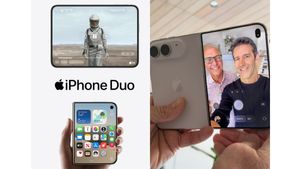 From Work To Netflix: 8 Everyday Things That Could Feel Different On iPhone Duo
 -
 62nd Maharashtra State Film Awards: Chhabila Wins Best Film, Rani Mukerji Honoured


Perfect Body Language During A Presentation!


Body Language: This basically consists of gestures, movements and facial expressions. To appear strong and confident during presentation, use your skills and positive body language. Through a positive body language, you can express yourself and connect easy with the listeners. Active body language shows energy and enthusiasm.
Eye contact: It is important to have eye contact with your listeners during presentation. This shows confidence and keeps them involved.
Dressing: As you are the center of attention who will present, dress well according to the occasion. Formal presentation should have the seriousness so wear formal attire. Set your hair and appear neat and clean for the presentation.
What to avoid?
Don't move your hand too much as it looks clumsy and irritating after sometime. Purposeful hand movements which are gentle and not too speedy looks good. Use facial expressions where required and avoid making faces when the listener criticizes you or points out some mistake.
Follow these tips to have the perfect body language; facial expressions, gestures and movements during presentations.

 Continue with Google

